Connected Standby (or called InstantGo in Windows 8.1)

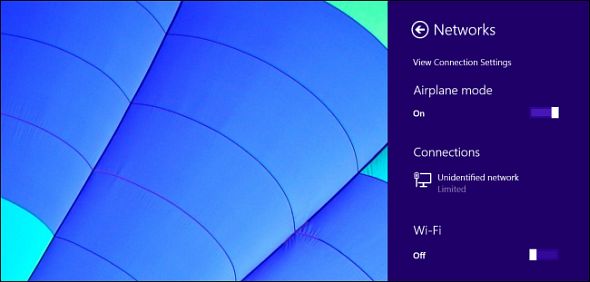
windows-8_1-airplane-mode_w590“Connected Standby” is a new feature in Windows 8. At first, only ARM devices with Windows RT supported Connected Standby. Some Intel Atom PCs with full Windows 8 now support it, too — and it will only become more common.

This is Microsoft’s attempt to give Windows 8 and 8.1 the “always-on” state people get from iPads, Android tablets, and smartphones. A PC with Connected Standby can’t use other power-management states like Sleep and Hibernate……(read the whole story)

‘Devices and Printers’ is blank, hangs, empty

2000px-Bluetooth_svg_w150If you try accessing ‘Devices and Printers’ from Control Panel and the system hangs or does not return any device, this could be caused by a not-so-perfect driver written for a Bluetooth adapter. The problem may cause other seemingly unrelated symptoms such as printers being offline for no reason.

Try the following and see if this will resolve the issue:

Click Start button, type “services” into the search program and files box. This brings up a list in the menu, select Services. This should open a list of local services on your system. Find ‘Bluetooth Service” and make sure it has started, right click and set to ‘automatic’. Select “Bluetooth Support Service” and start, set to automatic. Restart the system.

The above steps apply to a Windows 7 system. Similar procedures are available for other versions of Windows.

Blank Videos

FacebookIf you experience problems viewing online videos, e.g. in Facebook, which are Adobe Flash based, using Internet Explorer, you can try setting on ‘Use software rendering instead of GPU rendering’ in Internet Options under the Advanced tab.

One of the most common problems is that the video plays but it is blank; audio is fine. You will need to restart the browser for the option described above to take effect.

Bluetooth Device Intermittent Connection Problems

hp-touch-to-pair-mouseIf you experience intermittent connection problems with a Bluetooth device, e.g. a Bluetooth mouse, this could be resolved by turning off a feature in the Bluetooth adapter device settings.

Go to the Control Panel then Device Manager; locate the Bluetooth adapter; right click on it and select Properties; go to the Power Management tab and uncheck ‘Allow the computer to turn off the device to save power’; and click OK.

Thunderbird: Change Line Height in Folder Tree and Mail List

thunderbird_logo-only_RGB-300dpi_w200I thought I’ll briefly write down a tip that helped me yesterday when I upgraded from Thunderbird 3.1 to the new version 5 (which also applies to Thunderbird 6 and also 7, 8, 9, 10, 11, 12, 13 and probably more, given this ridiculous version system) – on WIndows 7, by the way. (This problem might not exist on other systems in the same way.)

TB5 uses a slightly different display for the folder tree and the mail list with a slightly bigger line spacing (which might simply be a side effect of the Calibri font). This may result in slightly better readability, but it also means that there are less mails and folders displayed in the same screen real estate, and since I like to use quite a lot folders to organize my mail collection, this resulted in the fact that not all folders could fit on the screen anymore, and having to scroll is inconvenient – especially since it’s virtually guaranteed that the next incoming mail will be put in a folder that’s currently not visible… Continue reading

Linksys Router E4200v2 or EA4500

E4200If you experience the following problem with either E4200v2 or EA4500 router from Linksys, you may want to apply the latest firmware (Ver.2.1.41.162351 released on July 31, 2014) from Linksys support site. The specific problem is annoying and sometimes critical if you don’t have a proper backup strategy in place. Media files on the external drive attached to the USB port of the router will be converted to folders on a random basis. Once turned to folders, it will be difficult, if at all possible, for these files to be accessible again. In other words, they are lost.

Analog Telephone Adaptor

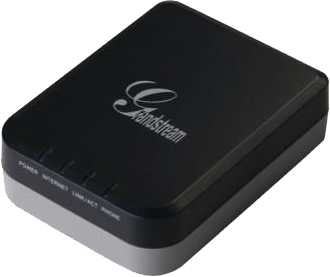
Grandstream Analog Telephone AdaptorIf you have a VOIP phone service at home, your service provider will give you an analog telephone adaptor such that you can connect the internet-based (digital) service to your existing (analog) phones. The adaptor will have an IP address just like other devices in your network when plugged into the router.

If you log into the phone adaptor (by pointing your browser to the adaptor’s IP address), you will find tons of configuration that can be tweaked to make it work better (or break it if you don’t know what you are doing). If you are really interested in understanding what or how each parameter should be set, these documents (#001, #002) will give you some clues (for Grandstream adaptors HT70x series).

User-Agent Strings

IE9A User-Agent String is sent by browsers when accessing a web server for identifying the type and properties of the browser. In some cases, you may want to force a certain browser to appear to be another (a different version or a totally different browser) for various reasons. You can override parts of the User-Agent String by modifying the registry. Details can be found in these two articles (Article 1 and Article 2).

Problem Downloading from Goolge Play

Google Play

If you experience problems downloading apps (or updates of existing apps) from Google Play on Andriod phones or tablets, try the following:

  • Go to ‘Settings’
  • Select ‘Apps’
  • Select ‘Google Framework Services’ and Clear Data (please only clear data; do not delete Google Services Framework completely)

Re-try the downloading and this may do the magic.